This brings us to my last blog post for the semester! I have really enjoyed posting my assignments here for EME 2040, and I hope you all have enjoyed reading through my work over the course of the semester. Although things have ended in a way that no one could have ever expected, I’m super happy that I was able to keep up with my workload, even with all my assignments and assessments being moved online! For obvious reasons, this class wasn’t much different, but overall, there was definitely a big adjustment.
Please enjoy my “funny” and creative final personal reflection about my experience in EME 2040. 🙂
Hello everyone! I hope this post finds you safe and healthy. For my final project, I decided to research and present on the technology trend of Cloud-Based Technology in the field of Education. As an aspiring educator, I know Cloud-Based Technology is not going anywhere anytime soon. In this digital storytelling project, I introduce my topic, discuss how both teachers and students integrate it into the classroom, give examples of how it has changed the field of education, discuss any advantages and disadvantages of this trend, share what the future looks like for teachers and students, give my thoughts on implementing this trend into my future classroom, and lastly, conclude with my honest opinion of the trend overall.
Unfortunately, there is a reoccurring watermark from Movavi Video Editor that pops up every couple of seconds throughout my project, because I did not purchase the premium version for this assignment. However, I am glad that I used a video editing software completely new to me, allowing me to expand upon my technological experience and knowledge.
For this week’s assignment, we were given the choice to research Blockchain, Bitcoin, or both, and create an animated whiteboard “explainer” video for whatever topic we chose. I chose to focus my project on Bitcoin, and in my explainer video I briefly share what it is, why people use it, the positives and negatives of using it, and the bright future that it creates for maintaining a more global economy.
I used an online virtual whiteboard drawing site called VideoScribe. Overall, this software was very easy to use and helpful in creating my project, but I did run into some issues when I went to download the finished product. The application kept crashing, and I even had to power my computer completely down in order for it to work. It was also frustrating that I couldn’t get rid of the VideoScribe watermark behind my video because I only signed up for the free trial.
I hope you learn something new in my video all about Bitcoin! Thanks for watching!
For this project, we had to work in a group from a previous project in the semester, and the topic that we researched was the advantages and disadvantages of using virtual reality (VR) in education. Throughout this presentation, we share four advantages and three disadvantages of using VR in education, ultimately coming to the conclusion that if this software were to become more present in classrooms, it would still need to be balanced with other ways of teaching material. I enjoyed working on this project because Adobe Spark was an interesting platform that I have never worked with before, and more importantly, this topic of VR in education will definitely have an impact on me in my future career as a teacher.
Hello everyone! I hope this blog post finds you happy and healthy during these crazy times. Above, I included a link to download the picture book that I created with Storybird for this week’s assignment. It’s titled “How to Manage Sadness: A Guide for Children to Find Happiness”.
I chose this topic for my book because I think is is very important for children to learn how to approach sadness and other more difficult emotions in their life. This is related to my personal goal of becoming an elementary school teacher, because I will most definitely have to work will children on how to navigate through their feelings.
The process creating my storybook was relatively easy, and I enjoyed using the Storybird software. It was incredible how much art was available for me to use in my book, and I really appreciated how none of the images had to be cited individually. The only difficulty that I ran into was after finishing my book, I was confused on how to publish it and embed the PDF file into this post.
As a future teacher, I can use the book that I created to teach my students how to manage their emotions and bring happiness into their lives. While this may not seem like a typical academic subject, learning how to control your emotions is critical to becoming a successful and healthy adult. The specific lesson that could be created from this topic would entail me reading this story to my class, and then having my students create their own “how-to” books on the strategies that they use on a daily basis to maintain their emotions. Not only will this teach students how to write and think creatively, but it will also help them to understand the importance of having emotional control at younger ages to foster a healthier adult life in the future.
Thank you so much for taking the time to download read my book, as well as read my discussion on this post about my experience with this assignment!
This animation outlines my midterm paper, the issue of increased screen-time usage in children negatively impacting their overall development. Not only can increased screen-times limit the social interactions that children have with their peers, but it can also lead to the development of behavioral issues later in life. One practical solution to solving this technology problem would be to follow the restrictions provided by medical professions for screen-time limits per day. It is also important to have “unplugged” times throughout the day where children are not distracted by their devices. Lastly, it is important that we all keep track of our own screen-time so that we can better monitor how technology is impacting our lives.
For this project, I used Animaker, and overall, I had a very positive experience creating my video. This software was very easy to use and fun to personalize, but the process of publishing the video and downloading it to my computer took well over twenty minutes. It was very frustrating trying to upload the file to this blog post as well. For future presentations, I would probably just use iMovie because it is a lot more familiar to me, and it doesn’t take nearly as long to publish and download my finished projects.
This week’s topic of the Inquiry Cycle was very interesting to me as a future educator. I think it is so important to give students the opportunity to really be responsible for their own learning, and the Inquiry Cycle does just that. In brief, Inquiry-Based Learning follows the following five steps: Ask, Investigate, Create, Discuss, and Reflect. Instead of a teacher leading their students in the traditional lecture style classes of today, the Inquiry Cycle gives the freedom of choice back to the students to really dive into the topics that they want to learn about. Not only does this make school more engaging, but by incorporating the Inquiry Cycle into curriculums, more students will want to actively participate in their learning on daily basis, and teachers will see more academic growth as a result.
I hope you enjoy learning more about the Inquiry Cycle and Inquiry-Based Learning in my Thinglink above!
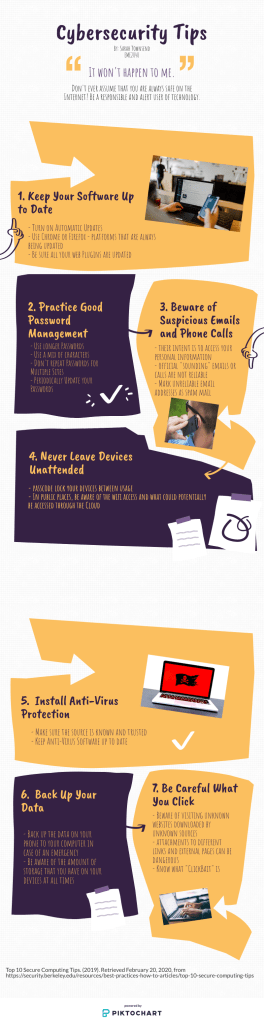
What is cybersecurity? Cybersecurity is the protection of computers and any other type of technology from digital theft, damage, or other disruptions. Cybersecurity also involves how to avoid cyberbullying or any other negative communication via the Internet. Below is a Piktochart with several tips on how to be safe online and avoid any hackers or computer viruses.
I organized this Piktochart with easy to follow tips about how you can better practice cybersecurity and safety when using the Internet. The tips that I included are as follows: keep your software up to date, practice good password management, beware of suspicious emails and phone calls, never leave devices unattended, install anti-virus protection, back up your data, and be careful what you click. While putting these tips into practice cannot insure a 100% chance of complete Internet safety, they will increase your chances of a positive Internet experience, whether it be on your mobile, laptop, or desktop device(s).
In response to the video about Emily and how she was “catfished” online, it was very startling for me to find out that someone so close in proximity to Emily would have stolen so much of her identity. I also think that it is crazy how Caitlin, the girl who created the fake account(s), kept up with her pursuit for two years without being noticed. From Emily’s story, I learned that you should never friend someone on Facebook or any other social media unless you really know them and their intentions in being your friend. Friending people because you see them occasionally or you know them through mutual friends is not a good enough reason to accept their request.
I can keep this story in mind when I’m connecting with other people via social media. I also think it is important to spread the word to my family and friends about how they can safely use social media by only following people who they actually know. Being careful about who has access to your profiles and pictures is very important because, like in Emily’s story, people can easily take your photos and create a fake identity if you leave your social media pages open to public access.
Overall, practicing good cybersecurity and being aware of your social media accounts is very important. Especially as technology continues to evolve, keeping track of all your accounts, devices, and profiles is crucial to keeping your identity safe.
Trends in Technology: Social Media in Learning Group Presentation
For my group’s project on various trends in technology, our topic was Social Media in Learning. Above is a voiced over recording of our presentation, and I enjoyed researching about this topic because it very applicable to my future profession. As a future elementary educator, I think my students would benefit from the use of social media in my classroom, because it will make them more motivated to participate and be active in their learning. However, I also know that social media can become a distraction, so I will have to monitor how much of it I decide to implement into my curriculum.
Our presentation consists of defining social media, how many people use it daily, and then applying its advantages and disadvantages into a classroom setting. Overall, my group members and I agreed that social media in learning is a very practical and helpful communication tool for students. It fosters community and creativity, while providing an interactive and structured technological experience.
I hope you enjoy watching our presentation on Social Media in Learning!
After reading about PowerPoints for this week’s module, there were several important takeaways that I will remember for any future presentations that I make.
The most important suggestions that I’m going to remember are to keep my presentations simple and spend plenty of time practicing. I definitely go overboard with the information that I put on my slides, so in the future, I will remember to keep my slides simple with minimal bullet points in order to keep my audience engaged. Additionally, I will practice actually giving the presentation with the PowerPoint pulled up so I’ll know exactly what I’m saying and when I’m saying it.
One thing that I learned about PowerPoint that I didn’t already know is that it was originally called “Presenter”specifically designed for Apple’s MacIntosh computers in 1984-85.
Yes – I have used PowerPoint to give a presentation before and I cannot say that my experience was neither great nor awful. I remember trying to be as engaging as I possibly could, but I also remember my presentation lacking a lot of character and excitement. I definitely would have followed more PowerPoint rules about adding more of my own personal style instead of using the same templates that the software provides.
I enjoyed creating my Museum Kiosk assignment on Google Slides because I had a lot of creative freedom to express my topic. I also really enjoy using Google Slides because it is very straightforward and user friendly. I got to personalize my presentation and add transitions with ease.
I hope you enjoy my Museum Kiosk on the benefits of yoga being implemented in elementary school classrooms!
 Technology for an Aspiring Educator